

The best smart pet feeders for reliable meal times are the PETLIBRO Granary for most cats, the PetSafe Smart Feed for established app control, and a large-capacity WOPET model for owners who want fewer refills; the right choice depends more on portion consistency, food compatibility, and backup power than on app features alone.
Our top picks
 PETLIBRO Automatic Cat Feeder
- Smart APP Control: Wi-Fi fully automatic dog feeder…
- Never Miss A Meal: Easily schedule up to…
- Personalized Meal Call: Record a voice message for…
 PETLIBRO RFID Automatic Cat Feeder
- Collar Tag Sensor-Activated Personalized Meals: Each cat wears…
- Prevent Food Stealing & Support Different Diets: RFID-controlled…
- Smart Cat Recognition & Real-Time Diet Tracking: Monitor…
 Frienhund Automatic Cat Feeder with 2K Camera:
- Go Out of Town Without Worrying : When…
- Feeding Schedule ( Regular Diet ) : Setting…
- Record Wonderful Moments ( Life ) : The…
| Product | Key specs | |
|---|---|---|
| PETLIBRO Automatic Cat Feeder | Smart APP Control: Wi-Fi fully automatic dog feeder… Never Miss A Meal: Easily schedule up to… Personalized Meal Call: Record a voice message for… | Check price |
| PETLIBRO RFID Automatic Cat Feeder | Collar Tag Sensor-Activated Personalized Meals: Each cat wears… Prevent Food Stealing & Support Different Diets: RFID-controlled… Smart Cat Recognition & Real-Time Diet Tracking: Monitor… | Check price |
| Frienhund Automatic Cat Feeder with 2K Camera: | Go Out of Town Without Worrying : When… Feeding Schedule ( Regular Diet ) : Setting… Record Wonderful Moments ( Life ) : The… | Check price |
 PetSafe Smart Feed Automatic Pet Feeder PetSafe Smart Feed Automatic Pet Feeder | Received the award for “Electronic Feeders/Waterers Product of… Ask Alexa to Feed Your Pet A Snack:… Amazon Dash Replenishment: Save yourself a trip to… | Check price |
As an Amazon Associate we earn from qualifying purchases at no extra cost to you.
Quick comparison of the best smart pet feeders
Capacities and dimensions can vary by model year and regional version, so confirm the specification for the exact unit before buying. The figures below are useful buying benchmarks rather than promises that every version will match precisely.
| Feeder | Approx. hopper capacity | Portion control | Backup power | Food compatibility | Best suited to |
|---|---|---|---|---|---|
| PETLIBRO Granary Wi-Fi | About 5 L | Small programmable portions; adjustable dispensing schedule | Battery backup on selected versions | Most dry kibble; some freeze-dried pieces if size permits | Cats and small-to-medium dogs wanting app scheduling |
| PetSafe Smart Feed | About 24 cups, approximately 5.7 L | Measured servings and slow-feed option | Optional or model-dependent battery backup | Dry and semi-moist food within the manufacturer’s size limits | Multi-meal scheduling and households already using PetSafe products |
| WOPET Wi-Fi automatic feeder | Commonly 4–7 L, depending on model | Usually multiple daily meals with adjustable portions | Battery backup on selected models | Dry kibble; check chute size for larger dog food | Owners prioritising capacity and broad model choice |
| Small 2–3 L Wi-Fi feeder | 2–3 L, roughly 8–12 cups | Often adequate for several small meals | Frequently limited or absent | Small dry kibble | One cat, limited counter space, or short periods away |
Our picks by situation
| Your situation | What to choose | Why |
|---|---|---|
| One cat and limited space | Compact 2–3 L Wi-Fi feeder | Less stale food sitting in the hopper and a smaller footprint |
| Several days between refills | 5 L or larger feeder | More reserve capacity, provided the food remains fresh |
| Large kibble or a small dog | Wide-chute model, such as a suitable WOPET or PetSafe unit | Reduces bridging and motor jams |
| Frequent internet outages | Feeder with physical controls and a documented battery backup | Meals can continue without cloud access |
| Dog that eats too quickly | Model with a slow-feed dispensing mode or compatible bowl | Spreads a meal over time rather than releasing it all at once |
| First automatic feeder | Simple Wi-Fi model with a clear local schedule | Fewer settings mean fewer setup and troubleshooting mistakes |
PETLIBRO Granary: best overall for most cats
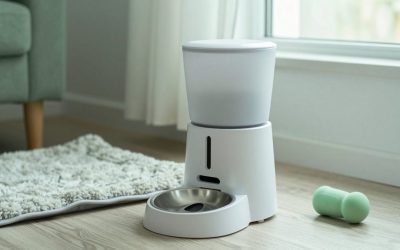
The PETLIBRO Granary range is a strong all-round choice when you want app scheduling without moving into a large, complicated machine. Its typical 5 L hopper is enough for many cats and small dogs, while the dispenser supports several meals per day and relatively small portions.
Its main advantage is flexibility: you can adjust meal times from a phone, receive alerts on supported versions, and use a sealed hopper design that helps reduce exposure to air and household dust. Look for a version with a battery compartment if uninterrupted feeding matters. A battery backup is not the same as full app availability; the feeder may continue its programmed schedule while remote changes are unavailable.
The limitation is food shape. Very large, oily, irregular, or soft pieces can dispense less consistently than ordinary dry kibble. Measure the actual food rather than relying only on the advertised portion size, especially if your cat’s daily ration is small.
PetSafe Smart Feed: best for established scheduling features
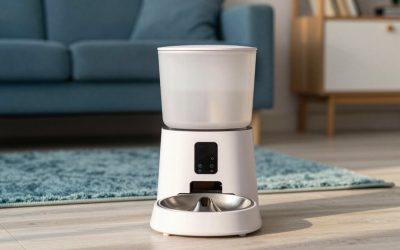
PetSafe Smart Feed models appeal to owners who want a recognisable ecosystem, a relatively large hopper, and a slow-feed function. A capacity of about 24 cups is useful for a medium dog or a multi-cat home, although filling a large hopper to the top is not automatically better: food can lose freshness before it is eaten.
The slow-feed setting is particularly useful for pets that gulp. It changes the delivery pattern, but it does not replace veterinary advice if rapid eating is accompanied by repeated vomiting, coughing, weight change, or other concerns.
Check exactly how the chosen version handles power loss. Some automatic feeders retain their schedule but require batteries to continue dispensing during an outage. If the app is central to your routine, also confirm that the feeder can be programmed locally before you rely on it.
WOPET: best when capacity and model choice matter
WOPET offers several Wi-Fi feeder designs, including models with approximately 4–7 L hoppers. That range makes it easier to match the machine to a cat, small dog, or larger meal plan. Choose by chute dimensions and dispensing mechanism rather than capacity alone. A large hopper is of little use if the opening cannot handle your dog’s kibble.
WOPET models commonly provide scheduled meals and app controls, but features differ substantially across the range. Verify whether the exact model includes a camera, battery backup, portion calibration, and a stainless-steel bowl. Camera and voice features are conveniences; they should not outweigh reliable offline dispensing.
What actually determines portion accuracy?
Feeders usually dispense by running a motor for a programmed interval or by rotating a measured mechanism. Neither method guarantees a perfect gram weight for every food. Kibble density, shape, moisture, and how full the hopper is can change the amount released.
Use this calibration process:
- Fill the hopper with the food you actually serve.
- Dispense the smallest planned portion into a bowl or container.
- Repeat the dispensing cycle 10 times.
- Weigh the combined food on a kitchen scale and divide by 10.
- Repeat with a fuller and nearly empty hopper to identify variation.
For example, if 10 cycles produce 430 g, the average cycle is 43 g. If your pet’s daily amount is 172 g, four cycles would approximate that amount. This is an estimate, not a nutritional prescription; use the feeding guidance from your veterinarian or food manufacturer for the appropriate daily quantity.
Food compatibility: dry food is the safe default
Most smart feeders are designed primarily for dry kibble. Semi-moist food may work only when the manufacturer explicitly permits it, and wet food generally requires a refrigerated or ice-pack meal feeder rather than a standard hopper dispenser.
- Measure your largest kibble piece and compare it with the stated chute range.
- Avoid mixing foods with very different shapes during initial calibration.
- Do not pour treats, supplements, or sticky food into a motorised hopper unless the manual allows it.
- For freeze-dried food, check whether the pieces crumble or bridge above the outlet.
Backup power and app reliability
A smart feeder has two separate reliability questions: can it dispense a programmed meal, and can you control it remotely? Wi-Fi loss may prevent notifications or schedule changes even when the feeder itself continues operating. A power cut is more serious because the motor cannot run without mains power unless batteries take over.
Prefer a model with:
- a schedule stored on the feeder rather than only in the cloud;
- physical buttons for at least manual feeding and basic programming;
- a clearly documented battery backup;
- a low-food or jam alert that does not depend solely on watching a camera;
- a power cable that your pet cannot easily chew or pull loose.
Test the system before leaving: unplug it, wait through one scheduled meal, and confirm that the correct amount is released. Then reconnect it and check whether the clock and schedule remain correct.
Cleaning, wear, and ownership costs
The bowl is normally the dirtiest part, but the dispensing path deserves equal attention. Oil from kibble can coat the chute, while dust can collect around the impeller or rotating cup. Unplug the unit before cleaning, remove loose food, wash removable food-contact parts according to the instructions, and allow everything to dry completely before refilling.
Plan on a weekly bowl wash for many households, with more frequent cleaning if food residue accumulates. Do not immerse the motor housing. Avoid pouring water into the hopper body or using aggressive cleaners that may leave residue.
The parts most likely to wear first are the silicone seals, bowl coating, lid latch, dispensing impeller, and batteries. Replacement bowls and seals may be easier to find for established brands than for an obscure model. A feeder costing roughly $60–$180 may therefore be better value than a cheaper unit that cannot be repaired or supplied with replacement parts.
Final buying advice
Choose the PETLIBRO Granary if you want a compact, capable smart feeder for ordinary dry cat food. Choose PetSafe Smart Feed if large capacity, slow feeding, and structured scheduling are priorities. Choose an appropriately sized WOPET model when you need more capacity or a particular combination of features. Whichever you buy, prioritise a food-compatible chute, locally stored schedules, tested backup power, removable washable parts, and a portion you have calibrated with your own kibble.

Write Your Review
No reviews yet. Be the first to share your experience!