

Key takeaways
- You want one unit for work, gaming and music.
- Your headphones range from efficient 32-ohm models to power-hungry planars.
- You have room for a roughly 15 × 13 cm box and a separate power cable.
The best desktop DACs for clean PC audio are the FiiO K11 for a full-size desktop setup, the Schiit Fulla E for USB-powered simplicity, the iFi Uno for the smallest budget system, and the JDS Labs Atom DAC 2 plus Atom Amp 2 when difficult headphones deserve more current and upgrade flexibility.
A DAC converts digital computer audio into an analogue signal; the amplifier then supplies the voltage and current your headphones need. For PC use, the important distinction is not the highest advertised sample rate. It is whether the unit has enough output for your headphone impedance and sensitivity, whether it remains quiet with sensitive earphones, and whether its USB-C connection is merely carrying audio or also powering the amplifier.
Our top picks


As an Amazon Associate we earn from qualifying purchases at no extra cost to you. Ratings are shown as listed on Amazon.
Quick picks by situation
| Situation | Best fit | Why | Typical market range |
|---|---|---|---|
| One compact box for most headphones | FiiO K11 | High output, 4.4 mm balanced option, display and gain control | About $130–$170 |
| Small USB-powered desktop setup | Schiit Fulla E | USB-C bus power, microphone input, simple front-panel control | About $110–$150 |
| Lowest-cost, smallest powered DAC/amp | iFi Uno | Very small footprint and useful analogue tuning modes | About $70–$100 |
| Hard-to-drive headphones or future upgrades | JDS Labs Atom DAC 2 + Atom Amp 2 | Separate, powerful amplifier and line-level upgrade path | About $250–$350 for the pair |
| Bluetooth as well as USB | Topping DX3 Pro+ | USB, optical, coaxial and Bluetooth inputs in one enclosure | About $190–$250 |
Best desktop DACs of 2026 compared
| DAC/amp | Power arrangement | Headphone output and impedance behavior | Approximate dimensions | Weight |
|---|---|---|---|---|
| FiiO K11 | USB-C audio plus separate DC power | 3.5 mm and 4.4 mm outputs; low output impedance, high available power | 147 × 133 × 32 mm | About 407 g |
| Schiit Fulla E | USB-C bus powered | 3.5 mm output; designed for efficient to moderately demanding headphones | About 145 × 91 × 39 mm | About 300 g |
| iFi Uno | USB bus powered | 3.5 mm output; best with efficient headphones and earphones | 88 × 81 × 26 mm | About 92 g |
| JDS Labs Atom DAC 2 + Atom Amp 2 | Separate USB DAC and AC-powered amplifier | 3.5 mm and 6.35 mm options; amplifier has very low output impedance and substantial headroom | Each unit about 128 × 100 × 28 mm | About 200 g each |
| Topping DX3 Pro+ | Separate AC power | 3.5 mm output; suitable for a wide range of low- and high-impedance headphones | 165 × 120 × 40 mm | About 386 g |
Dimensions are approximate external measurements and can exclude protruding knobs or cables. Allow at least 50 mm behind a unit for connectors; USB-C and 6.35 mm headphone plugs can make a shallow shelf feel much smaller in practice.
1. FiiO K11: best all-round desktop choice
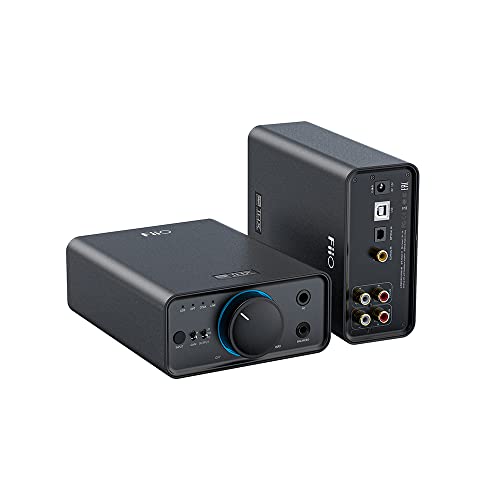
The FiiO K11 is the sensible default when you want a proper desktop DAC/amp without moving to a stack. Its separate power supply means the amplifier is not limited by the PC’s USB-C power budget. It provides both single-ended and 4.4 mm balanced headphone connections, a front display, gain control and line outputs for powered speakers.
Its low output impedance is a good match for modern low-impedance dynamic headphones, planar headphones and many sensitive models. Use the low-gain setting first with efficient headphones or in-ear monitors; high gain can make the volume control too abrupt and may expose background noise. The 4.4 mm output is not automatically “better,” but it can provide more output when the headphone cable and amplifier are both wired for balanced operation.
Choose it if
- You want one unit for work, gaming and music.
- Your headphones range from efficient 32-ohm models to power-hungry planars.
- You have room for a roughly 15 × 13 cm box and a separate power cable.
2. Schiit Fulla E: best USB-powered desktop DAC
The Fulla E is attractive when the desk has no spare outlet or you want a single USB-C cable from the computer. That cable carries both audio and power, so it is simpler than a conventional desktop DAC/amp. It also includes a microphone input, which makes it more useful for calls and gaming than many audiophile-focused units.
USB bus power is its key limitation. A laptop port or desktop USB hub has finite current available, and that limits maximum amplifier output compared with an AC-powered unit. It is a strong match for typical closed-back headphones, gaming headsets and efficient studio headphones, but it is not the first choice for insensitive planar headphones or high-impedance models that need substantial voltage.
Keep the Fulla E directly connected to the computer if a passive hub causes dropouts. A powered USB hub may work, but a damaged or very long cable can create intermittent connection problems that sound like a DAC fault.
3. iFi Uno: best for a very small desk
The iFi Uno occupies less than 0.01 square metre of desk surface, using roughly 88 × 81 mm before allowing for cables. It is a practical upgrade from a laptop headphone jack when your headphones are easy to drive and you want a physical volume knob. Its analogue modes can adjust the presentation for different headphones, but they should be treated as optional tone shaping rather than a substitute for amplifier power.
Because it is USB powered and compact, the Uno is better suited to efficient headphones and earphones than to demanding audiophile planars. With very sensitive in-ear monitors, start with the volume low and use the least aggressive gain or enhancement setting. A tiny box also has less cable separation, so avoid running its USB and analogue cables tightly alongside a laptop charger.
4. JDS Labs Atom stack: best for demanding loads and upgrades
The Atom DAC 2 and Atom Amp 2 separate conversion from amplification. This uses more desk space—two boxes occupy about 25.6 × 10 cm when placed side by side—but the AC-powered amplifier has considerably more headroom than a USB-only design. It is a strong choice for high-impedance dynamic headphones, inefficient planars and listeners who expect to change headphones later.
The stack’s practical advantage is serviceability and flexibility. You can replace the DAC without replacing the amplifier, use the amplifier with another source, or add powered speakers through the appropriate line connection. The trade-off is extra cabling, two power supplies and no built-in screen or wireless input.
5. Topping DX3 Pro+: best when inputs matter
The DX3 Pro+ is the better fit for a desk that includes a computer, television or phone. USB, optical, coaxial and Bluetooth inputs reduce the need for multiple converters. Its display and remote are useful when the unit sits beyond arm’s reach, while its AC supply gives it more output freedom than bus-powered alternatives.
Its single-ended headphone output keeps the layout simple, but there is no balanced headphone socket. Choose it for connectivity rather than for a particular connector style. If your only source is a PC and you do not need Bluetooth or optical input, a less expensive USB DAC/amp may be the better value.
How to match amplifier output to your headphones
Use the headphone’s impedance and sensitivity, not impedance alone. A 300-ohm headphone may need more voltage, while a low-impedance planar may need more current. As a rough planning method, compare the manufacturer’s sensitivity rating with the amplifier’s output specification and leave around 10 dB of headroom for musical peaks.
For example, suppose a headphone is rated at 100 dB sensitivity and you normally listen around 75 dB. A 10 dB peak margin means planning for 85 dB, which is 15 dB above the sensitivity reference. Since every 10 dB requires roughly ten times the electrical power, the peak target is approximately 32 mW when the sensitivity is specified at 1 mW. That is within the capability of many small desktop DAC/amps. This calculation is only an estimate because manufacturers use different sensitivity references, but it shows why ordinary efficient headphones rarely need a large balanced amplifier.
Check output impedance too
For multi-driver balanced-armature earphones, aim for an amplifier output impedance below about one-eighth of the earphone’s nominal impedance. A 16-ohm earphone therefore benefits from an output impedance around 2 ohms or lower. A higher value can alter frequency response and may make channel matching more noticeable. Most modern desktop DAC/amps listed here are low-impedance designs, but verify the specification when pairing an especially sensitive earphone.
Ownership details that affect the decision
- USB-C is not the same as USB-powered. The FiiO K11 uses USB-C for digital input but relies on separate power; the Fulla E and Uno draw amplifier power from USB.
- Volume knobs wear before DAC chips do. Keep dust out of the shaft, avoid forcing the knob against its stops, and disconnect headphones before repeatedly changing gain.
- Balanced cables do not create power by themselves. They help only when the amplifier has a genuinely separate balanced output and the headphone wiring is correctly terminated.
- Use line output carefully. Do not connect a fixed line output directly to passive headphones. Use the headphone output for headphones and a proper powered-speaker input for desktop speakers.
- Do not stack hot equipment. Leave ventilation around AC-powered units, especially under monitors or inside a closed shelf.
Final buying recommendation
Choose the FiiO K11 if you want the broadest headphone compatibility in one reasonably compact box. Choose the Schiit Fulla E when one USB-C cable and a microphone input matter more than maximum output. Choose the iFi Uno for an exceptionally small, inexpensive setup with efficient headphones. Move to the JDS Labs Atom stack when difficult headphone loads, long-term upgrades and amplifier headroom are priorities. Select the Topping DX3 Pro+ when optical, coaxial or Bluetooth sources are part of the plan.

Write Your Review
No reviews yet. Be the first to share your experience!