

Our Short List of 3
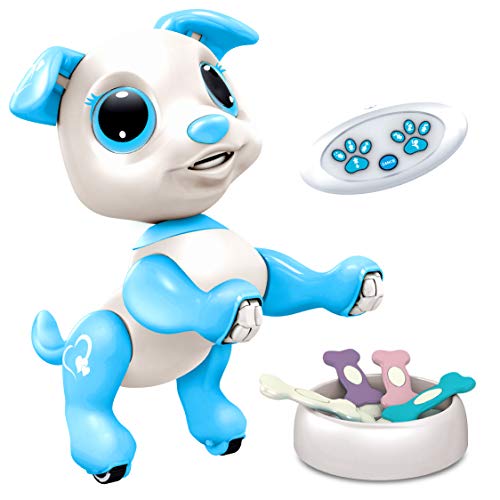
- Best for: Children aged 3 and up taking a first, screen-free step into sequencing.
- Brand: Power Your Fun
- Model name: Robo Pets Dog
- Model number: 8315A
- Dimensions: 5.91 x 4.72 x 3.54 inches

- Best for: Teenagers and classroom learners ready for graphical blocks and Python code.
- Brand: EF ELECFREAKS
- Model name: micro:bit xgo v2
- Model number: micro:bit xgo v2
- Dimensions: 9.8 x 5.7 x 6.7 inches

- Best for: Children who enjoy stunt routines, dancing, and touch-triggered play.
- Brand: Lterfear
- Model name: robot dog
- Model number: NO.3700
- Size: 5.1 x 8.6 x 6.4 inches
All 4 Picks at a Glance
| Product | Specs | Action |
|---|---|---|
| Power Your Fun Robo Pets Robot Dog |
| Check price on Amazon |
| ELECFREAKS XGO V2 Microbit Robot Dog Kit |
| Check price on Amazon |
| Lterfear Robot Dog |
| Check price on Amazon |
 Fisca Remote Control Robot Dog |
| Check price on Amazon |
Key takeaways
- Compare five programmable robot dogs that teach sequencing, remote control and real code, and pick the right one for your child age and skill level.
A coding robot pet is not really a pet, and it is not really a coding course either. The real decision is how much coding your child will actually do: follow a remote, chain a few moves into a short routine, drive the dog from a phone app, or write and change real code on a computer. A toy that only dances on command can still be fun, but it will not teach sequencing, and a kit that needs real code can frustrate a younger child who only wanted a robot dog to play with.
This guide is for parents, grandparents, and teachers buying a first programmable robot dog for a child, and for families with an older child who is ready to move past remote control play. Every product below was chosen from its name and specifications on its Amazon page, with the coding method, the control method, the battery setup, and the recommended age checked against that listing before it was included.
Quick Picks
As an Amazon Associate we earn from qualifying purchases
| Product | Best for | Key spec from title |
|---|---|---|
| Power Your Fun Robo Pets Robot Dog | Youngest beginners learning first sequences | 6 program treat keys |
| ELECFREAKS XGO V2 Microbit Robot Dog Kit | Older learners ready for real code | Graphical and Python programming |
| Dingdongwu Smart Robot Dog | App control with voice commands | App programming and 30 plus actions |
| Lterfear Robot Dog | Stunt routines on a remote | 20 functions with program mode |
| Fisca Remote Control Robot Dog | Voice commands and dance routines | 7 voice commands |
How to Choose
Match the coding method to the child age
The coding method matters more than the number of tricks. A young child learns sequencing best from something physical, such as feeding program treats to a dog in order and watching it carry out each step. An older child can handle an app where moves are arranged on a screen, while a teenager or a keen older learner can work with graphical blocks and then move on to typed code. Check the listing for the exact method rather than the word coding alone, because remote control, voice control, and real programming are three different things, and a mismatch here is the most common reason a robot dog ends up unused.
Check what the remote and the app really do
Some robot dogs are driven mainly by a paw-shaped remote, some take voice commands, and some add a phone or tablet app for building routines. A remote is simple and immediate, which suits younger children and shared play in a living room, but it usually limits routines to a short chain of moves. An app opens up longer sequences and saved routines, yet it also needs a compatible phone or tablet and a child who will sit still long enough to plan a routine. Before buying, confirm whether the remote batteries are included, whether the app is needed for the coding features, and whether the dog still plays without a phone nearby.
Look at battery life, charging time, and spares
Robot dogs run on rechargeable batteries, and the gap between play time and charging time shapes how a play session actually goes. One dog in this guide plays for about 40 minutes and charges in about 90 minutes, while another plays for about 30 minutes and needs about four hours to charge, so the second one needs more planning around school and homework. A spare rechargeable battery, where the listing includes one, can stretch a session without waiting for a charge. Also check whether the remote needs separate AA or AAA batteries, because those are often not included and are easy to forget on the first day.
Weigh size, weight, and where it will play
A small plastic robot dog that weighs about a pound is easy for a child to carry, store, and set up on a table or a rug, while a metal kit weighing more than four pounds is a tabletop project that needs a clear workspace and adult help with assembly. Wheeled dogs glide across hard floors and can struggle on thick carpet, and stunt dogs that do handstands and push-ups need a flat, clear surface to work properly. Measure the play space, check the dimensions and weight on the listing, and think about storage, because a large robot dog with a remote, a charger, and small accessories takes up more room than the box suggests.
The 5 Best Options
Power Your Fun Robo Pets Robot Dog
- Best for: Children aged 3 and up taking a first, screen-free step into sequencing.
- Brand: Power Your Fun
- Model name: Robo Pets Dog
- Model number: 8315A
- Dimensions: 5.91 x 4.72 x 3.54 inches
Children aged 3 and up taking a first, screen-free step into sequencing.
The remote needs 2 AAA batteries that are not included, and the dog should rest for 10 minutes before charging or playing again.
This blue robot dog suits the youngest coders because its programming is physical rather than screen based. A child feeds it program treats in a chosen order, and the dog then carries out that sequence, which turns an abstract idea like first, next, and last into something a small child can see and hear. Gesture mode and adventure mode add variety once the treats are understood, and the LED eyes change colour to show which mode is running. It is a gentle first step, not a route into typed code, so it fits families who want early sequencing without a phone or a computer in the loop.
ELECFREAKS XGO V2 Microbit Robot Dog Kit
- Best for: Teenagers and classroom learners ready for graphical blocks and Python code.
- Brand: EF ELECFREAKS
- Model name: micro:bit xgo v2
- Model number: micro:bit xgo v2
- Dimensions: 9.8 x 5.7 x 6.7 inches
Teenagers and classroom learners ready for graphical blocks and Python code.
The micro:bit board is not included, assembly is required, and the kit needs a clear tabletop workspace.
This metal kit is the most serious coding pick in the guide, and it is aimed at older learners rather than young children. It is a quadruped robot dog with fifteen movable joints, a robotic arm with end grippers, and support for graphical programming and Python code programming, so a learner can start with blocks and move toward typed code on the same machine. Assembly is required, the kit is built for tabletop use, and the listing gives a manufacturer minimum age of 180 months, which puts it firmly in teenager and classroom territory rather than the toy box.
Dingdongwu Smart Robot Dog
This wheeled robot dog bridges simple remote play and app-based coding, which makes it a good middle step for children who have outgrown treat-based programming. It responds to voice control and a remote, and its app programming feature lets a child arrange actions into a routine instead of pressing one button at a time. The listing gives more than 30 actions, an educational objective of teaching robotics and coding to children, and a size that suits floor play in a living room. It is also the largest dog in this guide, so it feels more substantial in hand than the smaller remote-control models.
Specs
- Brand: Dingdongwu
- Model name: AI robot dog
- Model number: AI robot dog
- Dimensions: 12.2 x 5.5 x 7.2 inches
- Weight: 1.4 kilograms
- Material: Plastic
- Actions: 30 plus
- Additional features: Interactive Voice Control and App Programming
- Educational objective: Teaching robotics and coding to children
- Included components: AI robot dog, charging line, remote control, user manual
- Batteries: 3 AAA batteries required, included
- Power source: rechargeable battery
- Manufacturer minimum age: 36 months
Best for: Children aged 6 and up who want app routines, voice control, and floor play.
Watch out for: The app features need a compatible iOS or Android device, so check the phone or tablet first.
ASIN: B0F267B7R1
Lterfear Robot Dog
- Best for: Children who enjoy stunt routines, dancing, and touch-triggered play.
- Brand: Lterfear
- Model name: robot dog
- Model number: NO.3700
- Size: 5.1 x 8.6 x 6.4 inches
Children who enjoy stunt routines, dancing, and touch-triggered play.
The remote needs 2 AA batteries that are not included, and the dog shuts down after 5 minutes with no operation.
This red bulldog-shaped robot dog is built around stunts, with 20 functions covering greetings, dancing, music, sitting down, handstands, and going prone. Its programming function works through the remote: a child presses the programming button, chooses several stunt buttons in order, and presses the programming button again to run the routine. That loop is easy to grasp and repeat, and the touch function on its back adds another way to trigger a greeting or a demonstration. Two rechargeable batteries are included, which helps when one runs down during a longer play session.
Fisca Remote Control Robot Dog
- Best for: Children aged 6 to 10 who like voice commands, stunts, and dancing.
- Brand: Fisca
- Dimensions: 8.6 x 5.7 x 8.48 inches
- Weight: 1 pound
- Battery: 3.7V 600mAh Lithium Ion rechargeable battery, included
Children aged 6 to 10 who like voice commands, stunts, and dancing.
Charging takes about four hours for about 30 minutes of play, and tricks are hard to do on carpet.
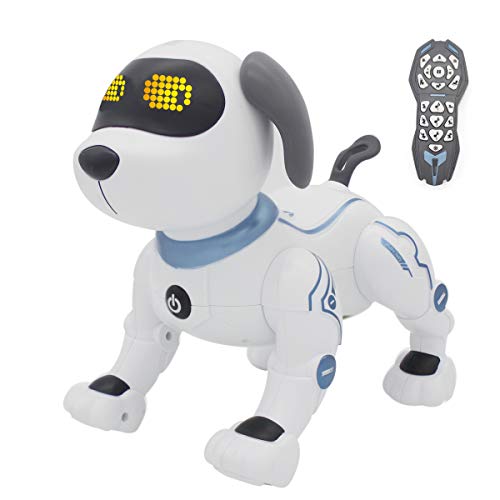
This stunt dog stands out for voice control, with seven spoken commands covering singing, standing at attention, sitting down, handstands, leaning over, saying hello, and push-ups. Its programming function lets a child chain actions together through the controller, and it also offers three dances with music, a demo mode, and touch interaction on its chin. The listing gives a recommended age of 6 to 10 years, a control distance of 20 feet, about 30 minutes of playing time, and a charging time of about four hours, so it rewards short, planned sessions rather than all-day play.
Which One Fits Your Situation
A first robot pet for a young child
Choose the Power Your Fun Robo Pets Robot Dog when the child is young and the goal is early sequencing without screens. Its program treats make the order of moves visible, the remote is simple, and the 40-minute play time fits a short session after school. Keep the treat dish and the six keys together in a small box, because losing a key narrows the routines a child can build.
A teenager or classroom learner ready for real code
Choose the ELECFREAKS XGO V2 when the learner is old enough for assembly, a tabletop workspace, and real programming. Its graphical blocks and Python support give a clear path from arranging moves to writing code, and the robotic arm adds a reason to keep experimenting. Remember that the micro:bit board is not included, so confirm that part is already available before ordering.
A child who wants an app and voice control
Choose the Dingdongwu Smart Robot Dog when a child wants to build routines on a screen and talk to the dog as well as drive it. Its app programming, voice control, and large floor-play size suit a living room, and the 30-plus actions keep routines varied. Check that the household phone or tablet runs the app before promising the coding features.
A gift for a child who loves stunts and dancing
Choose the Lterfear Robot Dog or the Fisca Remote Control Robot Dog when the main goal is a lively gift rather than a coding lesson. Lterfear offers 20 stunt functions and a spare rechargeable battery, while Fisca adds seven voice commands and three dances with music. Either way, buy the remote batteries at the same time so the gift works on the day it is opened.
Common Mistakes
- Buying a real-code kit for a young child who only wanted a dancing robot dog, then finding the assembly and the programming too advanced for them.
- Assuming every robot dog with a remote also teaches coding, when many only repeat single commands and never chain moves into a routine.
- Forgetting the remote batteries, which are often AA or AAA and not included, so the dog cannot be driven on the day it arrives.
- Expecting long play sessions from a dog that plays for about 30 minutes and then needs several hours to charge.
- Letting a wheeled or stunt dog loose on thick carpet, where it cannot glide or balance properly, and then blaming the toy for poor movement.
Frequently Asked Questions
What age is a coding robot pet best for?
It depends on the coding method rather than the dog alone. Treat-based sequencing suits children aged 3 and up, remote and app routines suit children aged 6 and up, and graphical blocks with Python suit teenagers. Always check the manufacturer minimum age and the recommended age on the listing, and match the coding method to the child rather than to the number of tricks on the box.
Do coding robot pets need a phone or a computer?
Some do and some do not. Treat-based and remote-programmed dogs work without a phone, while app-programmed dogs need a compatible phone or tablet for their coding features. A real-code kit needs a computer and, in the case of the ELECFREAKS kit in this guide, a micro:bit board that is not included. Check the listing before buying if the household has no spare device.
How long do coding robot pets play on one charge?
Play time varies a lot between models. The dogs in this guide range from about 30 minutes to about 40 minutes of play, while charging takes from about 90 minutes to about four hours. A spare rechargeable battery, where one is included, can extend a session, but it is still worth planning play around the charge time rather than expecting the dog to run all afternoon.
Are coding robot pets good for learning real coding?
They can be a useful first step, but only the real-code models teach typed programming. Treats, remote sequences, and app routines teach ordering, planning, and cause and effect, which are the ideas underneath coding. A kit with graphical blocks and Python, such as the ELECFREAKS model in this guide, is the one that carries a learner from arranging moves toward writing and changing code.
More from Amazon
Programs that pair well with the guide above. Offers and eligibility are set by Amazon and may change.
Set up recurring deliveries of everyday items on eligible products. Terms and savings are set by Amazon.
Explore Subscribe & SaveFree shipping on eligible items, Prime Video and more. Eligible new members can start with a free trial.
Start a Prime free trialAudiobooks and podcasts to listen to on the go. Eligible new members can start with a free trial.
Try Audible freeRead from a large library of eBooks and audiobooks on any device. Check Amazon for current plans.
Explore Kindle UnlimitedAs an Amazon Associate we earn from qualifying purchases.









Write Your Review
No reviews yet. Be the first to share your experience!